LidoNews Widget Code implementation
1. Widget code
The webmaster can copy the code-block and integrate it in the website.
The widget can be initialized only once in the website and can be placed everywhere with custom inline CSS styles on the main element.
The data will be refreshed every 10 second, to avoid performance issues on the hosting website and on our server.
<div id="ln-widget"></div>
Copy the below JavaScript code before the closing of the </body>
element.
<script>
    (function (w, d, s, o, f, js, fjs) {
    w['LidoNews-Widget'] = o; w[o] = w[o] || function () { (w[o].q = w[o].q || []).push(arguments) };
    js = d.createElement(s), fjs = d.getElementsByTagName(s)[0];
    js.id = o; js.src = f; js.async = 1; fjs.parentNode.insertBefore(js, fjs);
}(window, document, 'script', 'lnw', './lidonews-widget.js'));
lnw('init', {
    organizationId: 4018,
    language: 'it',
    title: 'Mercatino di natale Piazza Walther',
    design: "circle",
    hideLogo: 1,
    color: '#daa520',
    textColor: '#000000',
    titleColor: '#daa520',
    subTitleColor: '#e40A2d',
    widgetSize: 200,
    titleSize: 14,
    subTitleSize: 17
});
</script>
Our Widget doesn't need any additional third-party libraries.
2. Example of Widget implementation
Example of a widget implementation for the german language:
<!-- CODE START-->
    <!DOCTYPE html>
    <html lang="en">
        <head>
            <meta charset="utf-8">
            <meta name="viewport" content="width=device-width, initial-scale=1, shrink-to-fit=no">
            <title></title>
        </head>
        <body>
        <div id="ln-widget"></div>
        <script>
        (function (w, d, s, o, f, js, fjs) {
            w['LidoNews-Widget'] = o; w[o] = w[o] || function () { (w[o].q = w[o].q || []).push(arguments) };
            js = d.createElement(s), fjs = d.getElementsByTagName(s)[0];
            js.id = o; js.src = f; js.async = 1; fjs.parentNode.insertBefore(js, fjs);
        }(window, document, 'script', 'lnw', 'https://widget.lidonews.it/lidonews-widget.js'));
        lnw('init', {
            organizationId: 4018,
            language: 'it',
            title: 'Mercatino di natale Piazza Walther',
            design: "circle",
            hideLogo: 1,
            color: '#daa520',
            textColor: '#000000',
            titleColor: '#daa520',
            subTitleColor: '#e40A2d',
            widgetSize: 200,
            titleSize: 14,
            subTitleSize: 17
        });
        </script>
        </body>
    </html>
<!-- CODE END-->
3. Widget parameters
| Parameter | Description |
|---|---|
| language | The widget supports multilanguage and can be set with this parameter. If not set, the widget will choose by default the italian language |
| organizationId | This parameter is mandatory for the widget. The value for this parameter will be provided by LidoNews, because each organization has his own internal identifier. |
| title | With this parameter the webmaster can add a title to the widget (Example: Sauna or
Pool). If not set, the title will not be shown. |
| hideLogo: | With this parameter the webmaster can hide the lidonews logo. If not
set, it will be shown by default (the value will be setted to 0). |
| design | With this parameter the webmaster can choose which widget design they want to diplay on
their
page, either a circle or a square. |
| color | With this parameter the webmaster can personalize the color of the circle border. If not
set, it will be used the default color. The only supported color code type is the "Hex Color Code" like for example: #FF0000 (Red), #800000 (Maroon), #FFFF00 (Yellow) and so on. |
| textColor | With this parameter the webmaster can personalize the color of the text. If not
set, it will be used the default color. The only supported color code type is the "Hex Color Code" like for example: #FF0000 (Red), #800000 (Maroon), #FFFF00 (Yellow) and so on. |
| titleColor | With this parameter the webmaster can personalize the color of the title. If not
set, it will be used the default color. The only supported color code type is the "Hex Color Code" like for example: #FF0000 (Red), #800000 (Maroon), #FFFF00 (Yellow) and so on. |
| subTitleColor | With this parameter the webmaster can personalize the color of the subtitle. If not
set, it will be used the default color. The only supported color code type is the "Hex Color Code" like for example: #FF0000 (Red), #800000 (Maroon), #FFFF00 (Yellow) and so on. |
| widgetSize | With this parameter the webmaster can increase or decrease the size of the widget. If not
set, widgetSize will be not setted (default 165px) The only supported values are numbers like for example: 165 (size will be 165px x 165px), 100 (size will be 100px x 100px) and so on. |
| titleSize | With this parameter the webmaster can increase or decrease the font-size of the title. If not
set, titleSize will be not setted (default 14px) The only supported values are numbers like for example: 14 (font-size will be 14px), 12 (font-size will be 12px) and so on. |
| subTitleSize | With this parameter the webmaster can increase or decrease the font-size of the subtitle. If not
set, subTitleSize will be not setted (default 20px) The only supported values are numbers like for example: 20 (font-size will be 20px), 12 (font-size will be 12px) and so on. |
3.1 Available language parameters
| Parameter | Description |
|---|---|
| it | Italian (default) |
| de | German |
| en | English |
3.2 Available design parameters
| Parameter | Description |
|---|---|
| circle | Circle (default) |
| square | Square |
3.2 Available hideLogo parameters
| Parameter | Description |
|---|---|
| 1 | Show lidonews logo (default) |
| 0 | Hide lidonews logo |
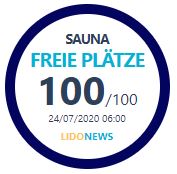
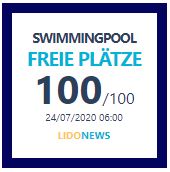
4. Preview of our widget layout
5. Implementing multiple widgets
It is possible to create multiple widgets on the same page and give them each a different purpose.
If, for example, the facility has multiple areas with different access types, it can be useful to have different information on the web page for visitors. Inside pool and ourside pool, sauna and pool, or spa and kids area, all of these options can be kept track of with a singular widget and a different ID.
In order to achieve this result, the webmaster needs to create different "div"s with customized IDs, and repeat these IDs in the correct 'init' function. Here is a code snippet:
<!-- CODE START-->
    <!DOCTYPE html>
    <html lang="en">
        <head>
            <meta charset="utf-8">
            <meta name="viewport" content="width=device-width, initial-scale=1, shrink-to-fit=no">
            <title></title>
        </head>
        <body>
        <div id="ln-widget-1" class="ln-widget"></div>
        <div id="ln-widget-2" class="ln-widget"></div>
        <div id="ln-widget-3" class="ln-widget"></div>
        <script>
        (function (w, d, s, o, f, js, fjs) {
            w['LidoNews-Widget'] = o; w[o] = w[o] || function () { (w[o].q = w[o].q || []).push(arguments) };
            js = d.createElement(s), fjs = d.getElementsByTagName(s)[0];
            js.id = o; js.src = f; js.async = 1; fjs.parentNode.insertBefore(js, fjs);
        }(window, document, 'script', 'lnw', 'https://widget.lidonews.it/lidonews-widget.js'));
        lnw('init', {
            organizationId: 2,
            language: 'de',
            title: 'Sauna',
            color: '#000000',

        }, ln-widget-1);
        lnw('init', {
            organizationId: 2,
            language: 'de',
            color: '#000000',
            title: 'Pool'
        }, ln-widget-2);
        lnw('init', {
            organizationId: 2,
            language: 'de',
            color: '#000000',
            title: 'Spa'
        }, ln-widget-3);
        lnw('init', {
            organizationId: 4018,
            language: 'it',
            title: 'Mercatino di natale Piazza Walther',
            design: "circle",
            hideLogo: 1,
            color: '#daa520',
            textColor: '#000000',
            titleColor: '#daa520',
            subTitleColor: '#e40A2d',
            widgetSize: 200,
            titleSize: 14,
            subTitleSize: 17
        }, ln-widget-4);
        </script>
        </body>
    </html>
<!-- CODE END-->
© RR-Solutions. All Rights Reserved. 2020
For questions please contact
info@lidonews.it